
September 1, 2026
Mid Market: 90 Day CRM Implementation Plan With Pilot Scorecard

Run a phased rollout over about three months with a multi-week pilot using real deals, clear adoption evaluation points at monthly intervals, and a contingency reserve for time and budget set at a considerable percentage. That structure gives you a working scorecard, clear KPIs at each gate, and a rollback path if migration goes sideways. Skip the pilot or the gates, and you’re just hoping adoption happens.
TL;DR:
- Conduct a three-month phased rollout with clear gates, pilot testing, and ongoing measurement to prevent scope creep and ensure user adoption.
- Test migration with sample data first, clean and map fields accurately, and keep the old CRM in read-only mode for at least 30 days post-migration.
- Focus on configuring only essential features, automations, and permissions aligned with current sales processes to reduce project duration and complexity.
- Select pilot participants working on real deals for 2 to 4 weeks, and evaluate success through specific KPIs like login rates and deal updates before full launch.
- Assign an adoption owner before configuration starts, allocate sufficient training resources, and establish governance routines like weekly review meetings.
Table of Contents
- What Does a 90-Day CRM Rollout Strategy Look Like?
- How Do You Migrate CRM Data Without Breaking It?
- What Should You Configure First in a New CRM?
- How Long Should a CRM Pilot Run, and Who Should Be In It?
- How Do You Get Employees to Actually Use a New CRM?
- What KPIs Prove CRM Adoption Is Actually Working?
- How Much Should a CRM Rollout Cost and How Long Should It Take?
- How Connection-built Supports CRM Rollout Projects
- The Part Most CRM Guides Get Wrong
- Get Help Running Your CRM Rollout
- Sources
What Does a 90-Day CRM Rollout Strategy Look Like?
Most CRM projects fail at deployment, not installation. The software goes live fine. What breaks is the change management around it: nobody trained the sales team on the new required fields, nobody owns adoption, and three months later half your reps are still tracking deals in a spreadsheet. HubSpot’s breakdown of CRM deployment makes this distinction explicit: implementation is the technical configuration, deployment is everything that makes people actually use it, and treating them as the same project is where plans go wrong.
A 90-day framework splits the work into three phases with hard exit criteria. You don’t move to the next phase until the current one passes its gate.
Phase 1: Days 1 to 30, foundation and governance
- Lock scope and success metrics with an executive sponsor before any configuration starts.
- Build your RACI: who approves customization requests, who owns data quality, who signs off on go‑live.
- Run the data audit (more on that below) and start deduplication.
- Configure the minimum viable setup: pipelines, required fields, user roles, and permission tiers.
- Draft your pilot team roster and communication plan.
Exit criteria: governance is documented, data audit is complete, and a working sandbox environment is ready for pilot users.
Phase 2: Days 31 to 60, pilot and iteration
- Launch the pilot with a small group using real, live deals, not sample data.
- Run weekly debriefs and triage fixes against a backlog.
- Connect core integrations, typically email and one marketing automation tool, and test them under pilot load.
- Build role‑based training materials based on what the pilot actually revealed as confusing.
- Adjust required fields and automations based on pilot friction points.
Exit criteria: pilot scorecard hits its adoption thresholds (below), integrations are stable, and training materials are field‑tested, not theoretical.
Phase 3: Days 61 to 90, full rollout and hypercare
- Roll out to all remaining users in waves, not all at once if your organization exceeds roughly 50 people.
- Staff hypercare: a dedicated support channel for the first two weeks post‑launch.
- Track adoption metrics daily for the first two weeks, then weekly.
- Log every “nice to have” customization request into a phase‑two backlog instead of building it mid‑rollout.
- Run the formal 90‑day adoption review against your original success metrics.
Exit criteria: adoption KPIs meet the 90‑day targets you set in Phase 1, and a prioritized backlog exists for the next quarter of enhancements.
This is also where budget discipline matters most. HubSpot’s research on deployment timelines found that a substantial number of CRM implementations run over schedule, often incurring notable overruns. A phased structure with defined gates won’t eliminate that risk, but it gives you checkpoints where you catch scope creep before it compounds across all 90 days.
How Do You Migrate CRM Data Without Breaking It?
Bad data is the single fastest way to sabotage a rollout. If reps open the new CRM and see duplicate contacts, missing deal stages, or garbled phone numbers, they’ll distrust the whole system within a week, and that trust is hard to rebuild.
The sequence matters. ZDNet’s migration guidance is direct on this point: audit and deduplicate before you export anything, map every field to its destination, and test the migration with a sample before you touch the full dataset.
- Audit your source system first: flag duplicate records, orphaned contacts, and fields nobody has updated in over a year.
- Document source complications: custom fields that don’t map cleanly, merged accounts, or legacy naming conventions.
- Build a field mapping sheet with transformation rules, for example “Lead Source (free text) maps to Lead Source (dropdown), and unmatched values default to ‘Other’.”
- Run a test migration using a 10 to 20% sample, then reconcile record counts and spot‑check field accuracy against the source system.
- Schedule the full migration during a low‑activity window, and write a rollback plan before you start, not after something goes wrong.
Pro Tip: Keep your old CRM in read‑only mode for at least 30 days post‑migration. It’s the fastest way to resolve a “where did this deal go” dispute without guessing.
Mapping and testing data before migration, rather than cleaning it up after import, is the difference between a rollout that feels stable and one that feels shaky from day one.
What Should You Configure First in a New CRM?
Time-to-value depends on restraint. The instinct to configure every possible field and automation before launch is exactly what stretches a 6-week project into a 4-month one.
- Align pipeline stages and required fields to how your team actually sells today, not to an idealized future process.
- Limit custom fields to what’s genuinely load‑bearing; a dozen well‑used fields beats fifty that nobody fills in.
- Build 3 to 5 automations first, covering the highest‑friction manual tasks (lead assignment, follow‑up reminders, deal stage notifications).
- Set up a sandbox environment separate from production so testing doesn’t corrupt live pilot data.
- Test the permission model and mobile experience before pilot launch; a broken mobile view kills field‑sales adoption fast.
- Create a lightweight change control process: every new customization request gets logged, scored for effort versus impact, and either built now or moved to the phase‑two backlog.
Everything beyond that core set belongs in the backlog you build during Phase 3, not in your initial configuration sprint.
How Long Should a CRM Pilot Run, and Who Should Be In It?
A pilot only works if it uses real deals. Rework’s guidance on CRM rollout is specific here: test data hides the edge cases and pipeline mismatches that surface only under live conditions, so pilot users need to be working actual, current deals from day one.
Run the pilot for 2 to 4 weeks with 10 to 20% of your total user base, drawn from a mix of high performers and average users so the feedback reflects the whole team, not just your most tech‑forward reps.
- Select pilot participants and confirm they’ll use the new CRM exclusively, not alongside their old tool.
- Set scorecard thresholds before the pilot starts, so you’re not negotiating “good enough” after the fact.
- Run 30‑minute debriefs every week with three fixed questions: what’s blocking you, what’s confusing, what’s working.
- Triage every issue raised into “fix before rollout” or “backlog for later.”
- Score the pilot against your scorecard before approving full rollout.
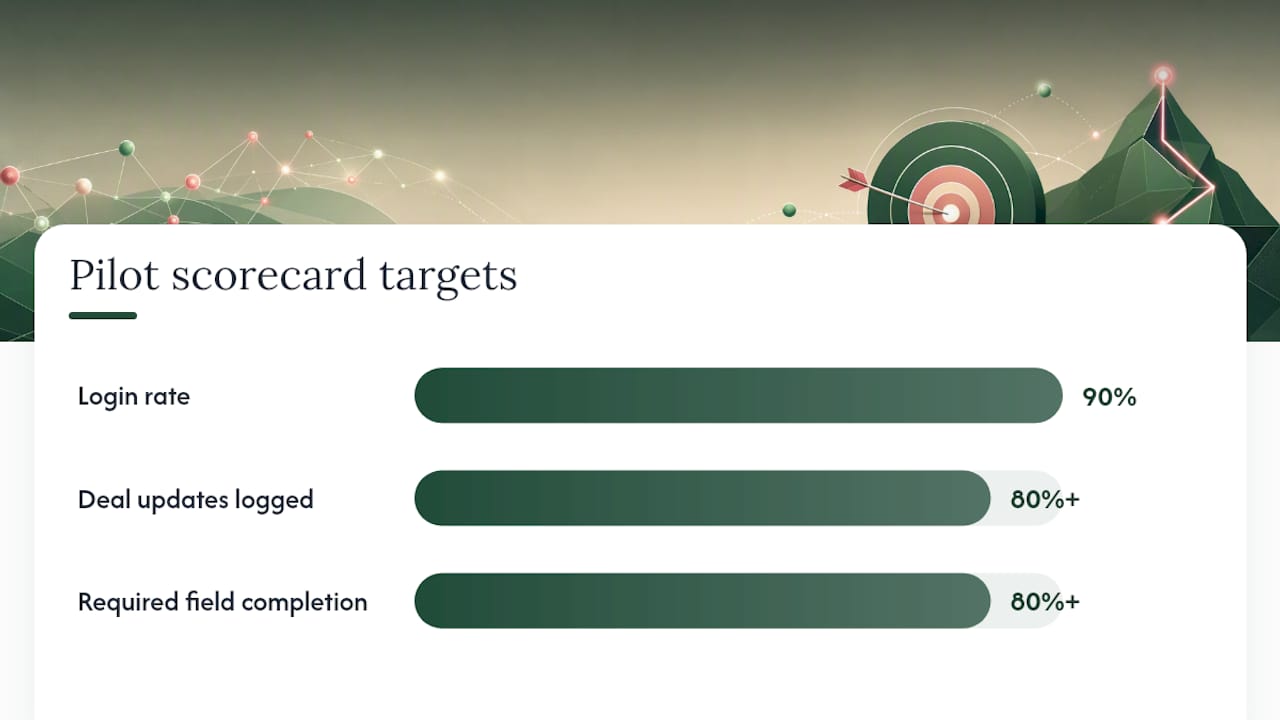
| Scorecard metric | What it measures | Target by pilot end |
|---|---|---|
| Login rate | Percent of pilot users logging in daily | 90% or higher |
| Deal updates logged | Percent of active deals updated weekly | 80% or higher |
| Required field completion | Percent of new records with all required fields filled | 80% or higher |
| Friction issues reported | Number of blocking issues raised per week | Declining week over week |
How Do You Get Employees to Actually Use a New CRM?
Adoption breaks down when training explains features instead of workflows. Nobody cares that a field exists; they care whether it helps them close the deal in front of them right now. Forvis Mazars’ guidance on CRM user adoption makes the case that role‑based training, mapped to what each person actually does daily, drives adoption far more than a generic system walkthrough ever will.
Structure your communication in layers: executives get the “why” and the business case, managers get the operational changes to their reporting, and individual users get the “here’s exactly what changes in your day.”
- Build a message map so each audience hears something relevant to their role, not a one‑size‑fits‑all announcement.
- Mix training formats: live sessions for the initial rollout, in‑app guidance for ongoing reference, office hours for troubleshooting, and one‑page job aids for quick lookups.
- Recruit peer champions on each team, people other reps already trust, and give them early access before general rollout.
- Name one person as the adoption owner for the full 90 days; without a single accountable owner, adoption questions have nowhere to land.
- Budget 20 to 30% of your total project cost for training. That figure, drawn from Softabase’s implementation checklist, consistently correlates with stronger adoption outcomes across mid‑market rollouts.
Pro Tip: Give champions a direct Slack or Teams channel to the project lead during the first 90 days. Informal, fast answers prevent small frustrations from turning into “I’m just going back to my old spreadsheet.”
What KPIs Prove CRM Adoption Is Actually Working?
User adoption, not feature count, is what determines whether a CRM pays for itself. That’s the core finding behind Rework’s research on CRM rollout: structured adoption programs with clear checkpoints reach ROI faster than rollouts that just flip the switch and hope.
Track these leading indicators weekly, not just at each gate:
- Deal update frequency: how often active deals get touched, not just created.
- Activity logging rate: calls, emails, and meetings recorded against the right deal.
- Required field completion: whether users are filling in what the system needs, or working around it.
- Stage progression: whether deals are actually moving through the pipeline, or stalling in one stage.
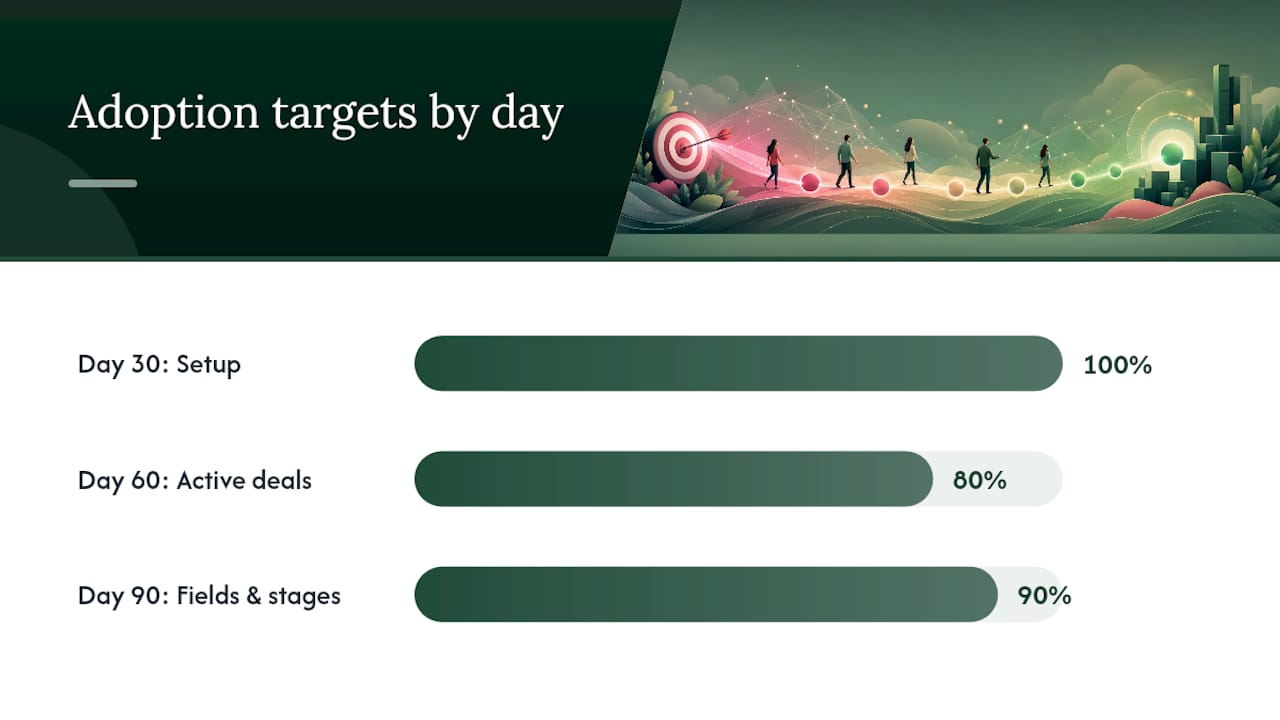
Set numeric targets at each gate. A reasonable structure: by day 30, 100% of users have logged in and completed setup; by day 60, 80% of active deals have been updated in the past week; by day 90, 90% of required fields are completed on new records and stage progression matches or beats your old system’s pace.
Pair the metrics with a governance cadence: a weekly adoption standup with your project lead and champions, a monthly steering review with the executive sponsor, and a quarterly data audit to catch drift before it becomes a mess. Structured, phased governance like this reduces rollout risk and speeds adoption compared to unmanaged launches, a pattern consistent across the mid‑market implementations most guides study. Close the 90 days with a formal adoption review against your original targets. Scheduling that review on day one, before the project even starts, is what keeps everyone accountable to it.
How Much Should a CRM Rollout Cost and How Long Should It Take?
Budget a notable contingency above your baseline estimate, in both time and money, since many implementations tend to run over schedule and skipping contingency risks missing your deadline.
Typical timelines vary by organization size: smaller teams generally complete a stable rollout in 4 to 8 weeks, while mid‑market organizations need 10 to 14 weeks, according to Softabase’s deployment benchmarks. The 90‑day framework in this guide fits comfortably within the mid‑market range while leaving room for a real pilot.
Before go‑live, confirm each of the following:
- User acceptance testing is signed off by pilot participants, not just IT.
- Hypercare staffing is scheduled for at least the first two weeks post‑launch.
- Support SLAs are documented so users know how fast to expect help.
- The rollback plan has actually been tested, not just written.
The most common failure modes: skipping the pilot to save time, migrating data before cleaning it, and launching without a named adoption owner. Each one shows up as a slow, quiet failure over the following weeks rather than a dramatic launch‑day collapse.
How Connection-built Supports CRM Rollout Projects
Most CRM rollouts stumble on the human side, not the technical side. That’s where Connection-built’s project and retainer services fit into a rollout like this one:
- Project leadership to keep governance, RACI, and timeline gates on track across all three phases.
- Messaging alignment so executive, manager, and user communications actually land instead of getting ignored.
- Training material development built around real workflows, not generic feature tours.
- Integration coordination across marketing and communication tools tied to the CRM.
Client outcomes documented in Connection-built’s success stories reflect this pattern: rollouts move faster when messaging and process work happen alongside the technical build, not after it.
The Part Most CRM Guides Get Wrong
Most CRM advice treats adoption like a training problem: teach people the features, and usage will follow. It won’t. The research behind this plan points somewhere else entirely: adoption is a governance problem wearing a training costume.
The pilot scorecard matters more than any feature checklist you’ll build. If your pilot group isn’t hitting login rates and field completion targets on real deals, no amount of additional training documentation fixes that. The fix is almost always upstream, in whether the fields you built match how people actually sell.
Here’s what I’d prioritize differently than most guides: name your adoption owner before you write a single configuration spec. Not after the pilot. Not at rollout. Day one. Every successful 90‑day rollout I can trace back through the research had one accountable person answering the “who owns this” question before technical work started. Every stalled one had that question still open at day 60.
Budget contingency isn’t a hedge against bad planning. It’s an acknowledgment that people, not software, set the real pace of change.
— Chris
Get Help Running Your CRM Rollout
Connection-built exists for exactly the gap this plan exposes: the messaging, training, and change management work that determines whether a CRM rollout sticks or stalls. If your team has the technical implementation covered but needs someone driving governance, communications, and adoption across the full 90 days, that’s the work we do alongside clients every week.
Engagements typically start as a project scoped around your rollout timeline, then shift to an ongoing retainer if you need continued marketing and people‑strategy support afterward. Review outcomes from past projects on our success stories page, then reach out through our services for small businesses and growing organizations to talk through what your rollout actually needs.
Sources
Want to talk it through? Start a conversation. https://connection-built.com