
August 31, 2026
14 Day Runbook for SEO Site Migration: 1:1 Redirects and Staging Crawl

Yes, an SEO site migration can preserve your rankings, but only if you treat it as a controlled project, not a launch event. Three actions protect you: build a 1:1 redirect map with server-side 301s, run full staging QA before anything goes live, and monitor daily for the first 14 days with same-day fixes. Moving domains also means Google Search Console verification and the Change of Address tool, in that order.
TL;DR:
- Building a complete URL inventory with traffic, backlinks, and keywords is essential to prioritize high-value pages and prevent ranking losses.
- A full staging QA, including redirect testing, schema validation, Core Web Vitals, and indexation checks, reduces preventable errors before going live.
- Redirects must be planed as one-to-one mappings with server-side 301 status codes, avoiding mass redirects to the homepage or chains that dilute signals.
- Continuous post-launch monitoring for at least 14 days, including crawl logs and search console errors, detects issues early and prevents long-term ranking impacts.
- Coordinating SEO, development, and stakeholder communication with a structured plan and clear ownership minimizes scope creep and helps diagnose problems quickly.
Table of Contents
- Quick-Start SEO Migration Checklist Before Go-Live
- Pre-Migration Planning: Scope, Inventory, and Rollback Triggers
- Staging Build and QA: What to Test Before Anything Goes Public
- URL Mapping and Redirect Strategy: The 1:1 Rule
- Launch Day: The Exact Checklist for Go-Live and the First 72 Hours
- Post-Migration Monitoring: Your 14-Day, 8-Week, and 12-Month Runbook
- The Migration Mistakes That Cause the Worst Damage
- How Connection-Built Approaches Site Migrations
- Keeping Stakeholders and Users Informed Through the Migration
- Protecting the Backlink Equity You’ve Already Earned
- Mobile and International SEO Factors You Cannot Skip
- What Happens to Paid Search Campaigns During Migration
- Reading Server Logs to Confirm Crawl Budget Is Working for You
- The One Thing Most Migration Advice Gets Backwards
- Get Expert Help With Your Website Migration
- Authoritative Resources to Consult Immediately
- Sources
Quick-Start SEO Migration Checklist Before Go-Live
A site migration checklist works best when front-loaded. Most of the ranking damage we see happens because a team skipped a step in the two weeks before launch, not because something broke on launch day itself. Here’s the sequence that keeps you out of trouble.
- Export your baselines. Pull GA4 and Search Console data for your top pages, top queries, and conversions. You need a “before” snapshot to know if anything actually broke.
- Build a full URL inventory. List every indexable URL, then rank them by traffic and backlinks so you know which pages absolutely cannot break.
- Create the 1:1 redirect map. Every old URL gets one destination. Test the highest-priority redirects manually before launch.
- Validate staging. Check robots.txt, meta robots tags, canonical tags, schema markup, and Core Web Vitals on your representative page templates.
- Submit sitemaps and confirm Search Console ownership on the new property. If you’re moving domains, prepare the Change of Address tool now (you’ll trigger it after redirects go live).
- Schedule launch during a low-traffic window and write down your rollback plan, including DNS TTL settings, before you touch anything in production.
Each of these gets its own deeper walkthrough below, but if you only have time to do six things right, do these six.
Pre-Migration Planning: Scope, Inventory, and Rollback Triggers
The single biggest predictor of a bad migration outcome isn’t technical error. It’s scope creep. Teams that bundle a domain change, a CMS switch, a full redesign, and a content overhaul into one launch lose the ability to diagnose what actually caused a ranking drop when one shows up. Isolating migration dimensions so you change one major variable at a time is the difference between a two-week recovery and a six-month mystery.
If your business genuinely needs a new domain, a new CMS, and a fresh design at the same time, that’s understandable. Just know you’re trading diagnostic clarity for speed, and budget extra monitoring time to compensate.
Building the authoritative URL inventory
Your migration lives or dies on one spreadsheet: the complete URL inventory. This isn’t a nice-to-have; it’s the single source of truth every other team member references. For every URL on the current site, capture:
- Current URL and proposed new URL
- Title tag and H1
- Indexed status (pull this from Search Console, not assumptions)
- Backlink count pointing to that specific URL
- Organic sessions over the trailing 90 days
- Conversions or goal completions attributed to that page
- Primary target keyword the page currently ranks for
That data set does double duty. It tells you which pages need white-glove treatment during the build, and it becomes your triage document if something goes wrong post-launch.
Ranking pages by value, then setting protection tiers
Once you have the inventory, sort it. A page with multiple backlinks and steady organic conversions goes in Tier 1: it gets manual QA, a dedicated redirect test, and a spot on your daily monitoring list. A thin blog post with zero backlinks and little to no traffic goes in Tier 3, and honestly, that’s a candidate for a 410 rather than a redirect.
This tiering exercise also surfaces an uncomfortable truth for a lot of sites: a meaningful chunk of your URL count is dead weight. Migration behaves like a domain-wide quality reassessment in how search engines evaluate the new property, so pruning low-value pages before you migrate, rather than dragging them along, tends to help the new domain’s early evaluation rather than hurt it.
Setting success metrics and rollback triggers
Decide now, before launch, what “the migration failed” looks like. Vague plans to “watch traffic” don’t hold up under pressure. Set specific thresholds:
- A significant drop in organic sessions to Tier 1 pages within a short period triggers an emergency review.
- A spike in Search Console coverage errors above a set number of URLs triggers an immediate audit.
- Loss of indexing on a notable share of Tier 1 URLs triggers a rollback discussion.
Pro Tip: Write your rollback criteria down and get sign-off from stakeholders before launch, not during a crisis. Deciding “how bad is bad enough to revert” while traffic is actively dropping is how good teams make panicked, wrong decisions.
Assigning ownership before anything moves
A migration touches SEO, development, design, content, and often paid media. Without clear ownership, “someone will check the robots.txt” turns into nobody checking it. Build a simple RACI: who’s Responsible for the redirect map, who’s Accountable for the go/no-go call, who needs to be Consulted on template changes, and who just needs to be Informed once it’s live. Put a name next to every task, not a department.
Staging Build and QA: What to Test Before Anything Goes Public
Staging environments cause more migration disasters than production bugs do, mostly because teams either expose staging to search engines by accident or fail to test it thoroughly enough to catch what production will do differently. Get controlled crawl access instead of leaving staging wide open: use HTTP authentication or IP allowlisting so your team and any auditing tools can crawl it, while search engines can’t index it.
Run through this sequence before you sign off on staging:
- Crawl the entire staging site with a crawler tool and check meta robots tags, canonical tags, hreflang (if you run international pages), schema markup, and internal linking patterns.
- Generate the new XML sitemap on staging and confirm it lists only the URLs you intend to keep, not orphaned test pages.
- Test Core Web Vitals on representative templates, not just the homepage. A product page, a blog post, and a category page can perform very differently.
- Run redirects in a sandbox against the live map before pushing to production, and verify your analytics and tag manager containers fire correctly on the new templates.
- Decide where automation ends and a human starts. Automated crawls catch structural issues at scale; a manual spot-check on your Tier 1 pages catches the visual and content regressions a crawler will never flag.
Common performance regressions worth hunting for specifically: unoptimized hero images carried over from a design mockup, render-blocking scripts added during theme development, and lazy-loading configurations that accidentally hide above-the-fold content from crawlers.
| Test area | What to check | Tool or method |
|---|---|---|
| Indexation signals | Meta robots, canonical tags, X-Robots-Tag headers | Manual crawl + spot-check |
| Structured data | Schema markup validity against current standards | Schema reference |
| Redirects | 1:1 mapping, no chains, correct status codes | Sandbox testing before launch |
| Page speed | Core Web Vitals on key templates | Field and lab testing tools |
| Sitemap accuracy | Only live, indexable URLs included | Sitemap validator |
The staging QA phase is where most preventable disasters get caught, which is exactly why it deserves more time than most project timelines allocate to it.
URL Mapping and Redirect Strategy: The 1:1 Rule

Your redirect map is not a nice-to-have document, it’s the operational core of the entire migration. Build it as a spreadsheet with, at minimum, these columns: old URL, new URL, redirect type, backlink count, organic traffic, and primary keyword. That backlink and traffic data isn’t decoration. It tells you which redirects need manual verification versus which ones can go through in a bulk pass.
A few rules keep this process from going sideways:
- Every redirect target should be the closest topical match, not a generic fallback. If a product page is discontinued, redirect to the category it belonged to, not the homepage.
- Avoid mass redirecting pages to your homepage. Search engines read dozens of unrelated redirects converging on one URL as a signal of a poorly executed migration, and it does little for the user who clicked expecting specific content.
- Use a 410 (Gone) status for content you’re intentionally removing rather than force-fitting it into a redirect that doesn’t serve the user.
- Implement redirects server-side, not through JavaScript or meta refresh tags, and test for redirect chains. A URL that hops through two or three 301s before landing dilutes signal and slows the user down.
- Update your internal links to point directly at final destination URLs. Relying on redirects to catch internal links that should have been updated is a temporary patch, not a permanent fix.
The keyword-to-URL mapping table doubles as your post-launch triage document, so keep it updated rather than archiving it the moment you go live.
Launch Day: The Exact Checklist for Go-Live and the First 72 Hours
Launch day success comes down to sequence discipline. Lower your DNS TTL well in advance, cut over during a genuinely low-traffic window for your audience, and confirm your TLS certificate is valid on the new environment before you flip anything.
Work through this order:
- Remove every staging block. Confirm robots.txt allows crawling and meta robots tags read “index, follow” where they should. This single step causes more migration disasters than any other item on this list.
- Sample-test your highest-value redirects live in production. Check for chains, loops, or unexpected 404s on the pages you flagged as Tier 1.
- Submit your new sitemap in Search Console. If you moved domains, trigger the Change of Address tool now, after redirects are confirmed live, not before.
- Run quick functional checks: GA4 tracking fires, Search Console shows the new property verified, and any lead forms or transactions complete end to end.
Google’s own migration guidance is explicit that the Change of Address tool should follow live redirects, not precede them; sequencing it backward can confuse how Google associates the two properties.
A migration case-study pattern worth internalizing: teams running daily monitoring in the first 14 days recover measurably faster than teams checking in weekly, because early detection turns a one-day fix into a one-day fix, instead of a two-week compounding problem.
Post-Migration Monitoring: Your 14-Day, 8-Week, and 12-Month Runbook
Monitoring cadence should shrink in frequency as risk drops, not stay flat for months. Structure it in three phases.
Days 1 through 14: check daily. Review Search Console coverage reports, your top 500 keyword rankings, GA4 landing-page sessions, and any spike in 4xx or 5xx errors. Redirect errors specifically deserve their own daily glance, since a broken redirect on a high-traffic page compounds fast.
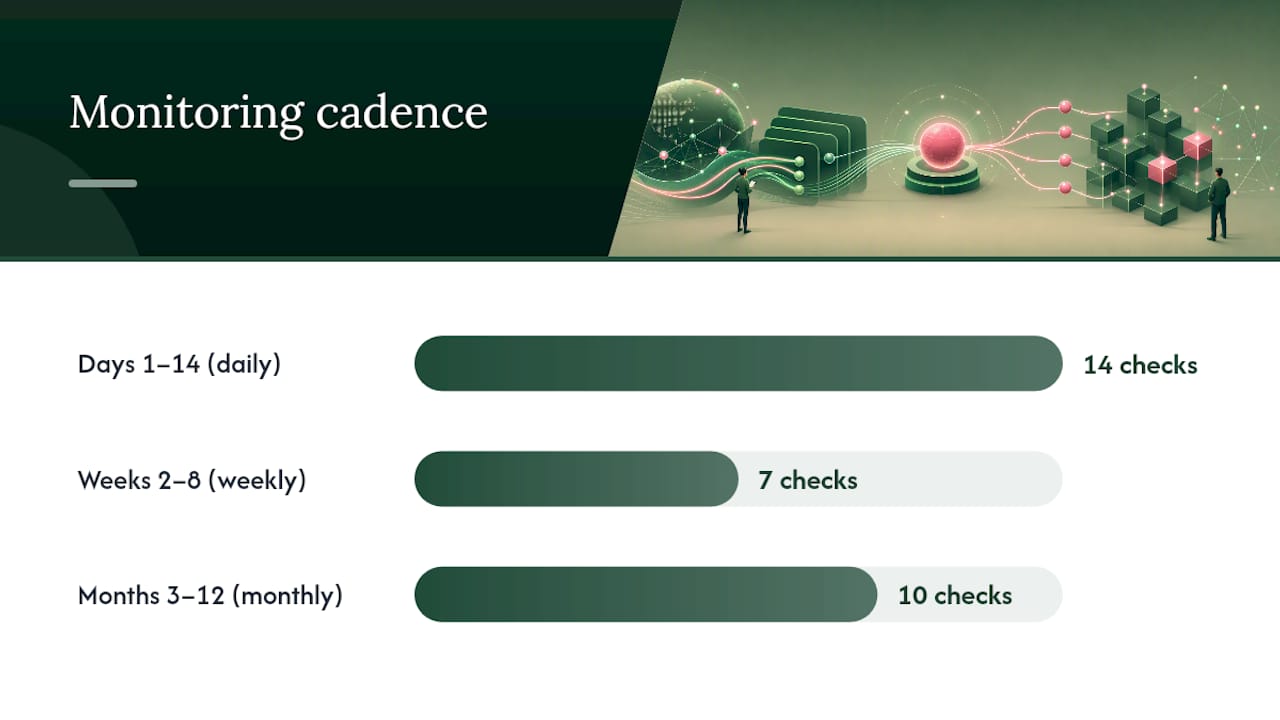
Weeks 2 through 8: check weekly. Rankings stabilize during this window for most sites, and weekly checks are usually enough to catch a slow leak before it becomes a crisis.
Months 3 through 12: check monthly. By this point you’re watching for drift, not disaster, things like a template update six months later that accidentally strips schema markup again.
- Pull log files and confirm Googlebot is actually hitting your new URLs and receiving 301 or 200 responses, not silently failing on old paths.
- When you spot a drop, isolate the channel first: is it organic specifically, or did overall traffic move? Then check redirects, then templates and canonical tags, then robots.txt and sitemap status, in that order.
- Reach out to your highest-value linking domains and ask them to update the link directly rather than relying on the redirect indefinitely. A tool like automated backlink monitoring can flag which referring domains still point to old URLs months after launch.
- Keep redirects live for at least 180 days, and 12 months is the safer default if you moved domains, since abandoned domains sometimes get scooped up for spam.
Pro Tip: Log-file analysis feels like the step everyone skips because it sounds technical, but it’s often the fastest way to prove whether Googlebot even noticed your redirects. If your logs show Googlebot still crawling old URLs and getting 301s back weeks later with no ranking movement, that’s a signal worth escalating, not ignoring.
The Migration Mistakes That Cause the Worst Damage
Nearly every catastrophic post-migration traffic loss traces back to one of four repeatable mistakes.
- Staging robots.txt shipped to production. This blocks your entire new site from being crawled. Fix it immediately by correcting the file, then manually request reindexing on your most important URLs in Search Console.
- Redirecting everything to the homepage instead of building real 1:1 mappings. The fix is painful but necessary: rebuild the redirect map properly and reimplement it, page by page, targeting the closest topical match.
- Template updates that quietly strip H1 tags or schema markup. These regressions often pass a visual review because the page still looks fine. Revert the template change or patch it directly, then trigger a recrawl on affected pages.
- Bundling too many changes at once, which makes it nearly impossible to tell whether a ranking drop came from the redirect, the new design, or the content rewrite. If you’re mid-crisis and can’t isolate the cause, staged rollback, reverting one variable at a time, is often faster than trying to debug everything simultaneously.
How Connection-Built Approaches Site Migrations
We treat every migration as a cross-discipline project, not a technical checklist handed to one developer. Our team coordinates SEO, web development, content, and stakeholder communication in parallel, because a migration that succeeds technically but confuses your internal team or your customers still counts as a rough launch.
A few artifacts we build into every migration engagement:
- A RACI chart naming who owns the redirect map, who signs off on go-live, and who gets looped in only for visibility.
- A keyword-to-URL mapping template tracking old URL, new URL, primary keyword, backlink count, and redirect status in one document.
- A monitoring schedule that shifts from daily to weekly to monthly checks, matched to actual risk level rather than arbitrary time blocks.
Our work with clients across West Michigan has shown us that the businesses who come out of a migration stronger are the ones who treat it as a chance to clean up years of content debt, not just a lift-and-shift.
Keeping Stakeholders and Users Informed Through the Migration
A migration that goes technically well can still feel chaotic if nobody outside the project team knows what’s happening. Set up a short, recurring update, weekly is usually enough, that tells leadership and department heads three things: what’s on track, what changed since last update, and what decision (if any) needs their input.
For internal stakeholders, translate technical risk into business language. “We’re testing redirects” means less to a sales director than “we’re making sure the pricing page customers bookmark still works after launch.” Give them a plain-language go-live date and a plain-language “what to watch for” list.
For your actual site users and customers, silence during a migration usually reads worse than a heads-up. If you’re changing domains, a short email or banner explaining that URLs are changing, and that bookmarks or saved links will redirect automatically, prevents a wave of confused support tickets. If your migration includes a login system, e-commerce checkout, or account portal, warn users about the exact maintenance window, because a redirect that works perfectly for search engines can still feel broken to a customer who hits an unexpected screen mid-transaction.
Customer support and sales teams deserve their own briefing too. They’re the ones fielding “why doesn’t this link work anymore” calls, and they answer better when they know it’s coming.
Protecting the Backlink Equity You’ve Already Earned
Backlinks pointed at your old URLs represent years of earned trust, and a sloppy redirect plan is the fastest way to waste that equity. The core defense is simple: every URL with inbound links gets a direct, topically matched 301, verified individually rather than swept into a bulk rule.
Pull your backlink profile before migration and rank referring URLs by authority and relevance, then cross-reference that list against your redirect map to confirm nothing with real link equity is heading to a 404 or, worse, a homepage catch-all. This is exactly why your URL inventory needs a backlinks column in the first place: it turns “check your backlinks” from a vague instruction into a concrete, sortable task.
Post-launch, don’t assume the redirects are doing all the work forever. Reach out to your highest-value linking sites, especially ones with a handful of powerful links rather than hundreds of low-value ones, and ask them to update the URL directly. A direct link update is stronger than a redirect that could theoretically expire or get misconfigured months later. Monitoring tools built for this exact problem can flag which referring domains still point to retired URLs long after launch, so you’re not manually re-checking a spreadsheet every quarter.
Mobile and International SEO Factors You Cannot Skip
If your current site serves multiple countries or languages, migration is where hreflang implementations quietly break. Every language or region variant needs its hreflang tags rebuilt and cross-referenced on the new site, and a single mismatched pair (Page A pointing to Page B, but Page B not pointing back) can confuse how search engines serve your international variants.
Mobile deserves equal scrutiny, not an afterthought pass. If your new site changes how mobile templates render, especially navigation, forms, or lazy-loaded content, run your Core Web Vitals testing specifically on mobile devices, not just desktop. Mobile performance regressions are usually the more damaging bucket, because most search traffic now arrives through mobile devices, and slow, broken mobile experiences hit rankings and conversions at the same time.
For sites with regional subfolders or ccTLDs, confirm your redirect map preserves the regional structure rather than accidentally collapsing everything into one default locale. A German subfolder redirecting to an English homepage is a common, easily missed error that quietly tanks international visibility for weeks before anyone notices the pattern.
What Happens to Paid Search Campaigns During Migration
SEO teams sometimes forget that a URL migration doesn’t stay contained to organic search. Every paid search campaign pointing at old landing page URLs needs its destination URLs updated to match your new site structure, ideally before launch, not discovered broken after ad spend has already gone out the door.
Coordinate with whoever manages your paid campaigns well ahead of go-live. Quality Score and landing page relevance signals can dip if ads suddenly point through a redirect chain instead of landing directly on the intended page, and that dip can quietly raise your cost per click. Update destination URLs in your ad platform to the final new URL, not the redirect, even though the redirect would technically work. Direct paths perform better and avoid tracking discrepancies.
Also check that conversion tracking pixels and any UTM parameter structures survive the template change. A migration that quietly breaks conversion tracking for paid campaigns can make a perfectly healthy launch look like a performance collapse in your ad platform’s dashboard, purely because the data pipeline broke, not the campaigns themselves.
Reading Server Logs to Confirm Crawl Budget Is Working for You
Rankings and traffic dashboards tell you the outcome, but server logs tell you why. Pulling raw server logs after launch lets you see exactly which URLs Googlebot is requesting, how often, and what status code your server returned. If Googlebot is still hammering old URLs weeks after launch and getting anything other than a clean 301, that’s your redirect map telling you it has gaps.
Crawl budget, the rough allotment of how many pages a search engine will crawl on your site in a given window, can get squeezed during migration if your new site structure creates more URLs, more parameters, or more redirect hops than the old one did. Watch for Googlebot spending disproportionate crawl activity on low-value URLs (faceted navigation, tag pages, duplicate parameter variants) instead of your Tier 1 pages. That’s a signal to tighten your robots.txt rules or canonical tags, not just wait it out.
Log-file verification of Googlebot behavior is the kind of technical step that gets skipped because it requires server access most marketing teams don’t have handy. It’s worth the extra coordination with your development team, because it’s often the clearest evidence you’ll get that your redirects are actually working the way your redirect map says they should.
The One Thing Most Migration Advice Gets Backwards
Most migration guides treat the technical checklist as the whole job: get the redirects right, submit the sitemap, watch Search Console, done. That advice isn’t wrong, but it treats migration as a one-time event instead of what it actually is: a quality re-evaluation window where a search engine forms a fresh opinion of your domain.
The teams that come out ahead aren’t the ones with the cleanest redirect spreadsheet. They’re the ones who used the migration as a reason to cut the content that never should have existed and simplify a URL structure that had grown crooked over years of patchwork fixes. A staged, crawlable pre-launch window matters more than most checklists admit, especially for smaller sites, because it gives search engines time to discover your new structure before you’re relying entirely on redirects to do the introducing.
If your migration touches more than a domain and a template, and your team doesn’t have someone dedicated to daily monitoring for two straight weeks, that’s the point to bring in outside help, not after rankings have already dropped.
— Chris
Get Expert Help With Your Website Migration
A checklist gets you far, but a migration with real traffic and revenue at stake benefits from a team that’s coordinated redirect maps, staging QA, and monitoring runbooks together before. Connection-built runs migration work as a coordinated engagement, not a checklist handed to one person: strategy for what to keep and what to cut, full redirect mapping, staging validation, and the daily monitoring cadence that catches problems in hours instead of weeks.
If your team is weighing a redesign, a domain change, or a full replatform in the months ahead, a migration audit before you touch staging can surface risk while it’s still cheap to fix. We work with small businesses and nonprofit organizations across West Michigan and beyond on exactly this kind of project. Visit our services page to request a migration audit and get a plan built around your specific URL count, backlink profile, and timeline before you schedule a launch date.
Authoritative Resources to Consult Immediately
- Google Search Central’s site moves documentation for official redirect and Change of Address guidance.
- Semrush’s migration checklist for a phased task breakdown.
- Archive to snapshot pages before cutover.
Sources
Want to talk it through? Start a conversation. https://connection-built.com